FreeFileSync

FreeFileSync is a free Open Source software that helps you synchronize files and synchronize folders for Windows, Linux and Mac OS X. It is designed to save your time setting up and running backup jobs while having nice visual feedback along the way.

Features

  • Synchronize network shares and local disks
  • Synchronize MTP devices (Android, iPhone, tablet, digital camera)
  • Synchronize via SFTP (SSH File Transfer Protocol)
  • Detect moved and renamed files and folders
  • Show disk space usage with directory trees
  • Copy locked files (Volume Shadow Copy Service)
  • Detect conflicts and propagate deletions
  • Binary file comparison
  • Configure handling of Symbolic Links
  • Automate sync as a batch job
  • Process multiple folder pairs
  • Comprehensive and detailed error reporting
  • Copy NTFS security permissions
  • Copy NTFS extended attributes (compressed, encrypted, sparse)
  • Copy HFS+ extended attributes and ACLs
  • Support long file paths with more than 260 characters
  • Fail-safe file copy prevents data corruption
  • Cross-platform: Windows, Linux, Mac OS X
  • Expand environment variables like %UserProfile%
  • Access variable drive letters by volume name (USB sticks)
  • Native 64-bit support
  • Manage versions of deleted/updated files
  • Prevent disc space bottlenecks via optimal sync sequence
  • Full Unicode support
  • Highly optimized runtime performance
  • Include/exclude files via filter
  • FreeFileSync portable and local installation available
  • Handle daylight saving time changes on FAT/FAT32
  • Use macros %time%, %date%, et al. for recurring backups
  • Case-sensitive synchronization
  • Built-in locking serializes multiple users synchronizing the same network folder
  • … download and use for free!

2wheelsnorth – Search Engine Optimisation (SEO)

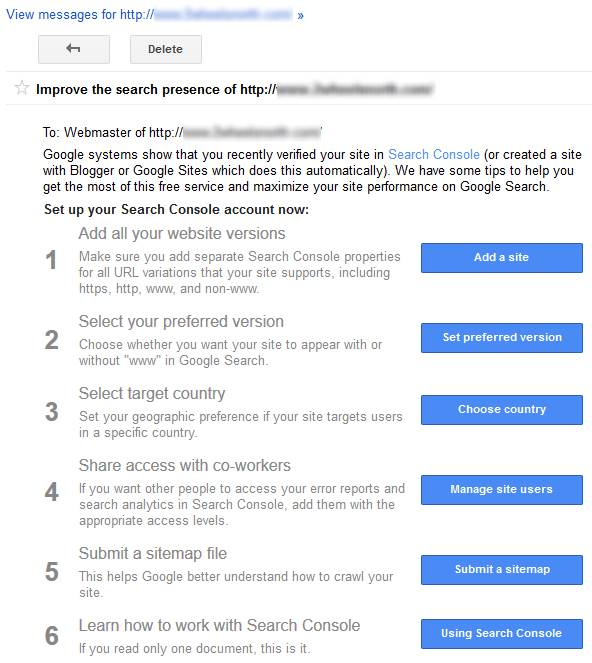
Google Search Console

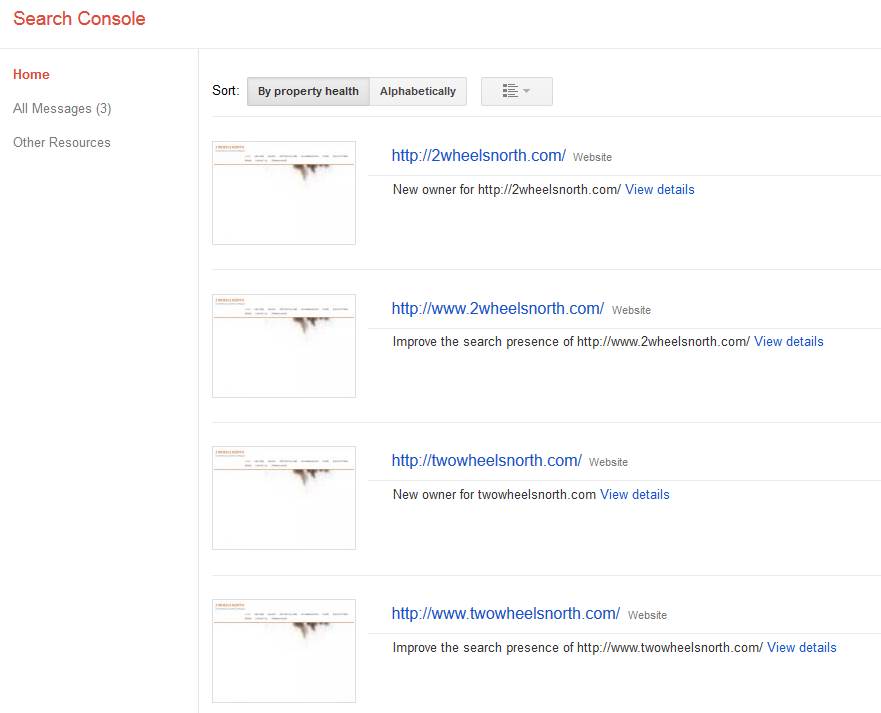
Register in Google Search Console:

  • http://2wheelsnorth.com
  • http://twowheelsnorth.com
  • http://www.2wheelsnorth.com
  • http://www.twowheelsnorth.com

Set target country in Google Search Console.

Submit sitemap file to Google Search Console.
seo_2wheelsnorth_001


External links

This page links to http://www.2wheelsnorth.com.   Please change this to simply “2wheelsnorth.com” if possible.

‘www’

In the dim and distant days at the dawn of the web, those publishing a website on print media would add the ‘www’ prefix. It informed everyone you’d moved into the twenty-first century and owned a piece of prime real estate on the World Wide Web like www.facebook.com or www.google.com.

Fast forward to 2016. Everyone knows what the web is — few organizations publish their websites with a preceding www. People understand that google.com, facebook.com and twitter.com are websites.  There is no need to put “www” in the name.  You could even leave out the “http://” bit.

Timeline posts about different spelling of the website have been removed – excellent.  Facebook page looks great.

This page links to http://www.2wheelsnorth.com.  Please change this to simply “2wheelsnorth.com” if possible.

Facebook

Now that we have a Facebook page, we should enable social media integration on the website so that people can simply click on a “like” or “share on Facebook” button to link to Posts on the website and add them to their Facebook Timeline.  This increases crosslinking between sites and results in your website reaching a larger audience.  Also, external links to your website will improve search ranking.

I have enabled the following plugins:

  • AccessPress Social Counter
  • AccessPress Social Icons
  • AccessPress Twitter Feed
  • Social Share WordPress Plugin – AccessPress Social Share

AccessPress Social Counter

A plugin to display your social accounts fans, subscribers and followers number on your website.

AccessPress Social Icons

A plugin to add social icons on your website.

AccessPress Twitter Feed

A plugin to show your Twitter feed on your website.

Social Share WordPress Plugin – AccessPress Social Share

A plugin to add various social media shares to a site

Please feel free to explore the newly added options in the Dashboard of your website.


Social Icons

The following social media accounts can be displayed on your website:
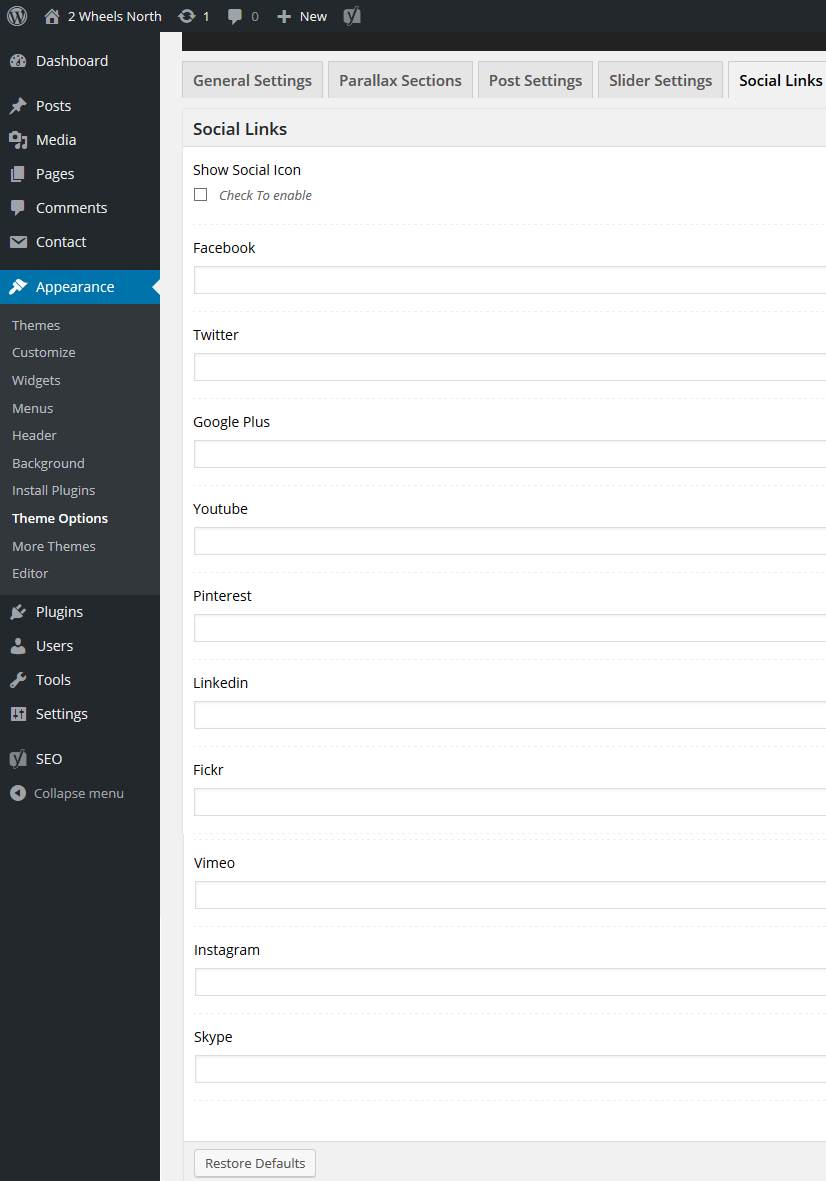
seo_2wheelsnorth_002

For now I have just added your Facebook account to keep things simple.

For every Social Media platform you use, a link will be visible on the website so people can go there and check it out:

seo_2wheelsnorth_003

Also, Google Search Console will pickup that your website has a presence on Facebook, Twitter, etc. improving your search ranking.

Social Share icons

Also, every post and page on your website now has ‘social share’ icons below it.

You can now simply click on the “share on Facebook” button next to a post to publish it directly to your Facebook timeline!  This saves you having to write content twice.  It also increases the number of links to your website.

  1. Write a new Post in ‘Stories’ on your website.
  2. Publish the new story.
  3. Click on the “share on Facebook” button to publish the story on your Facebook timeline.

Yoast SEO

Your website uses a plugin named “Yoast SEO” to help you write high quality posts.  This should help to improve your website’s ranking on search engines.

  • I have disabled the Readability statistics and only enabled Search Engine Optimisation (SEO) features as to not unnecessarily complicate things.
  • I have changed a setting where it said “Personal website” to “Business website”.
  • I have listed your Facebook account so it will be advertised to search engines.

Now that this is all operational I have focused on adding more content to the web site:

Please have a look at the following post (in the Dashboard):

http://2wheelsnorth.com/malanda/

Notice the SEO traffic light is GREEN.  I have followed all guidelines to turn this article into a high quality post.  Note all the green traffic light icons below:
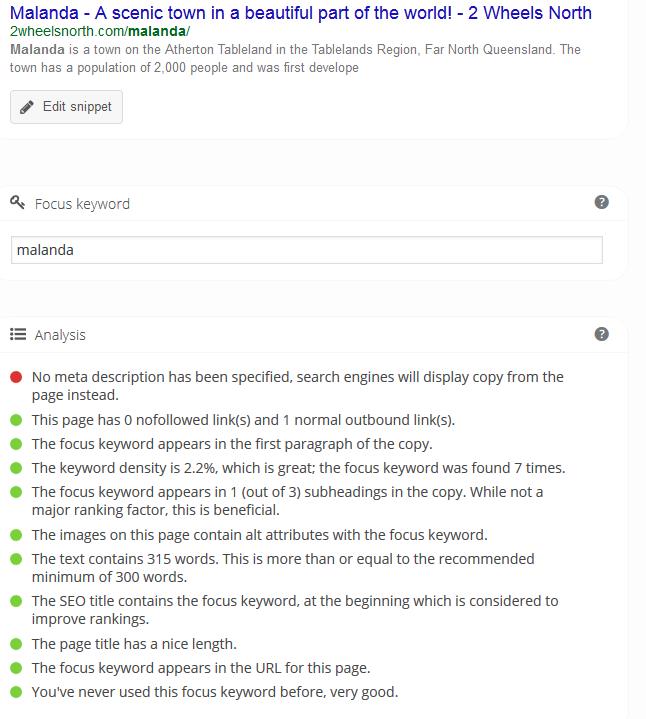
seo_2wheelsnorth_004

I have added three more articles featuring some of the keywords you provided:

http://2wheelsnorth.com/riding-malanda-paradise/

http://2wheelsnorth.com/ducati-mad/

http://2wheelsnorth.com/eat-drink-merry/

If I now simply search for “malanda” and “ducati” in Google, http://2wheelsnorth.com shows up at the top of the list!

For a website to remain relevant and interesting to visitors, it is a good idea to keep adding new posts every so often.  Whenever you feel inspired or have some photos from a ride or tour you would like to share, why not write a story on the website, assign it to the “Stories” category and click the ‘share on Facebook’ button to add it to your timeline on Facebook?

This concludes our time and efforts – please feel free to contact us if you have any questions or need for assistance.  Thank you for your business.



Search Engine Optimisation (SEO)

Google MyBusiness

Add your business to Google My Business to have it show up in Google Search as business.  You will be required to verify your business details via postal mail.  You can upload a profile picture and a logo picture.  You can set a location on the map and list business opening hours.  These steps will improve your business’ visibility on the internet.

Google Webmaster Search Console

Search Console is a free service offered by Google that helps you monitor and maintain your site’s presence in Google Search results. You don’t have to sign up for Search Console for your site to be included in Google’s search results, but doing so can help you understand how Google views your site and optimize its performance in search results.

In order to verify ownership of a website, adding a TXT record in DNS to verify ownership is preferred.  If we register a domain name and host a website for you, we will look after this so you don’t have to.  Additionally, if you provide us with a Google account we can give you access to the Google Webmaster Search Console if preferred. We also register your website with Google reCaptcha for Contact-Us form validation.  Please note that Google Webmaster Search Console is an external product and not part of any domain name registration or web hosting service.  We can however assist you with any Google Webmaster Search Console related queries.

Once the website is registered with Google Webmaster Search Console, the following requires attention:

seo_001

The first thing to do is add http, https, www and non-www site addresses to the Search Console.  This will ensure all variations of our website are indexed.

Setting a geographic area as a preference is useful to target the country of residence.  Search Console is most likely able to determine this by analyzing the website content at a guess.

Submitting a sitemap file is preferred.  Even if all website content can be found by following the links on the main page, simply having a sitemap submitted probably ticks a box and improves your ranking.

Search Engine Optimisation

The real purpose of SEO is to help people who are looking for your business to be able to easily find you.  In order to achieve that, you have to match the content on your website to what people are most likely trying to find.

Search engines have bots that automatically crawl your website, “reading” it to find out what it’s about and then deciding which keywords each of your pages should rank for. You can influence their “decisions” by strategically optimizing your content for certain keywords.

This is especially true if you’re creating content that bots can’t read. It’s easy for bots to interpret text, but they aren’t advanced enough yet to watch videos, look at images, or listen to audio. You’ll need to describe them, so they bot can understand and rank your pages for the appropriate keywords.

One quick word of warning, though.

Writing solely for search engines usually makes your content boring, and typically, that won’t help convert your visitors into customers. It’s far better to focus on people first, making your content as easy as possible, and then optimize for search engine bots where you can, without sacrificing the persuasiveness of your content.

Pay attention to:

  • Titles – Create eye-catching titles that raise the reader’s interest. You only have one chance to make a great first impression.
  • Permalink – The address (URL) of an article on your web site.
  • File naming – The file name and title of pictures or documents on your web site.
  • Keywords – Pick keywords that will help bring people to your site and are relevant.
  • Links – Link to quality sites that compliment what your website is about. It’ll encourage sites in your niche to link to you as well.
  • Quality – Try to publish unique and quality content. This prompts users to come to your site because they cannot easily find the content elsewhere.
  • Freshness – If you are publishing content that does not age or become outdated, that’s great, but you also need to add new content on a regular basis.
  • Mobile Usability – Make sure your website loads properly on a small screen mobile device.
  • Page load speed – Slow loading websites are likely penalized in page ranking.
  • Title, Description and Keyword tag – Make sure the information in these tags accurately reflects the page contents.
  • Headings – Make sure to use headings and use them in the correct order <h1>, <h2>, <h3>, etc.

And most importantly, do not publish someone else’s content on your site. This creates duplicate content, and search engines can penalize you for it.